This phone is from the era when Alcatel was trying to make a comeback. It's a phone from the era when Alcatel wanted to be reborn. Personally, I really liked the Onetouch Fire series, which attempted to bring Boot to Gecko to mobiles — a nice idea that I really liked. However, neither Firefox nor Android phones helped Alcatel gain a serious market share.
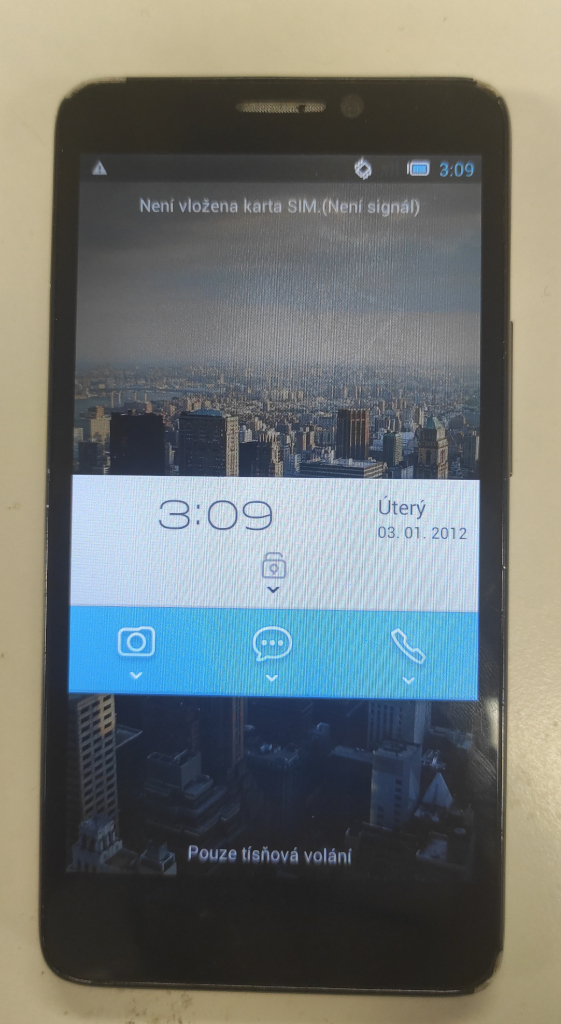
However, I also got today's phone as a present from my friend Tom. This phone was released in 2013 and came with Android 4.1. Based on my brief research, the reviews were quite good. It was a mid-range phone with a fairly good display and high-quality manufacturing, especially the back, which looks like brushed metal even though it is plastic.
The mismatch between my experience and the articles I read from 2013–14 is the system. The articles are about a very clean version of Android, where Alcatel made minimal changes compared to other manufacturers.
However, the first time I took this phone in my hands and turned it on, I could hardly believe that it ran on Android. The first thing I noticed was that it booted from power-off to a usable state in just 7 seconds, which I found unbelievable. I will write about the boot process later.
When it booted, it showed a lock screen which was very unusual. You won't see anything like it on any other Android phones. It looks like someone took the Android lock screen and tried to render Windows Mobile tiles over it. Some of the tiles work as real shortcuts and one of the tiles is a notification area that works as the unlock slider when you pull it downwards. It took me a while to figure out how to unlock it.
The launcher looks familiar and hasn't really changed. It's just overcrowded with widgets and interactive icons based on current trends. However, the settings are completely different and, in some cases, a little 'undone'.
The 'About' section, which usually shows build numbers, Android version numbers and so on, has 'Jelly Bean' under 'Build number'. I was looking for the real version number to enable multiclick to unlock developer options. However, there are no developer options at all. They have spread all the developer options through all the settings submenus and hidden menus of those submenus, so it is completely different too.
Now, let's talk about the phone itself. It's quite good and has a lot of RAM for its age — 1 GB. Everything runs smoothly, and I have tried a lot of Android 4 games. Even the AAA titles run smoothly, so the phone's hardware is really good.
The only problem this phone has in common with others from the early 2010s is the very low internal memory. After a fresh boot, the user has around 1.8 GB available.
One last piece of information concerns fast booting. I found a "Quick Boot" option in the settings that is enabled, but I'm not sure what it does or how it works. I guess that the power-off is not 'total', and that something is still running in the background or being kept in RAM, so for battery saving purposes I turned it off. Of course, I'm not sure if this makes a difference, as I don't know how quick booting actually works. However, I don't really care if the phone takes longer to boot up for collection purposes, so at least I haven't made anything worse in the worst case.

Jan "Jenkings" Škoda - blog
Simplifying IT, Amplifying Knowledge